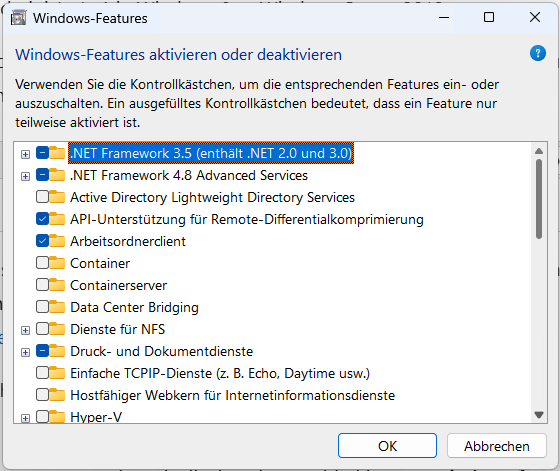
Bei manch älterer Software kann es auch noch unter Windows 11 vorkommen, dass ihr das .Net Framework-Paket in der Version 3.5 nach installieren müsst. Nachdem das „normale Setup-Programm“ bei mir nicht loslaufen wollte, war ich auf der Suche nach einem alternativ Web und bin auf einer Microsoft Support-Seite fündig geworden. Nachfolgend eine Kurzanleitung – wir besprechen hier die „Online-Variante“:
- Open a command prompt with administrator user rights (Run as Administrator) in Windows
- To Install .NET Framework 3.5 feature files from Windows Update, use the following command:
DISM /Online /Enable-Feature /FeatureName:NetFx3 /All

Use /All to enable all parent features of the specified feature. For more information on DISM arguments, see Enable or Disable Windows Features Using DISM.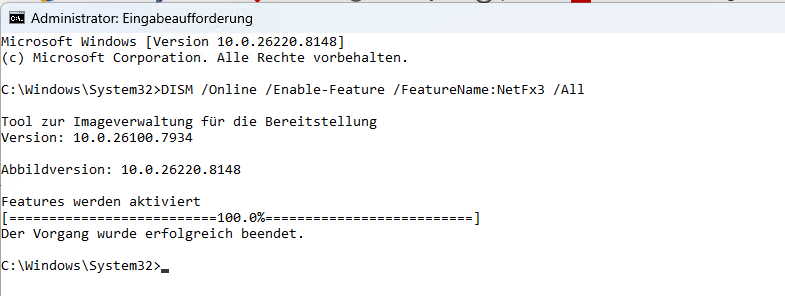
- Check to see if the feature was enabled:
On Windows desktop edition PCs, after installation .NET Framework 3.5 is displayed as enabled in Turn Windows features on or off in Control Panel.
For Windows systems, feature installation state can be viewed in Server Manager.